
Digital Marketing for Australian Orchid Shows and Events
A practical guide for orchid societies, show committees and event volunteers
If you've ever found yourself volunteered into the role of "social media person" for your orchid society with no real plan beyond posting the odd photo and hoping people show up, this guide is for you. It's written for committee members and volunteers who know orchids inside out but have had little exposure to digital marketing.
I've put this together using my own background and the planning I've done for Orchids Central 2026. You'll see that show used as a worked example throughout, but everything here applies just as well to a single-society spring show in a community hall as it does to a multi-society event.
Nothing in this guide requires a marketing degree or a big budget. Most of it can be done on a phone, for free, by someone with an hour or two a week, that’s certainly my setup for the most part.
Introduction: why orchid shows need better digital marketing
Australia has excellent orchid shows, fairs and society displays, but many of them are still promoted as if the internet is an optional extra. A flyer goes up, a Facebook post appears a few days before the event, members share it … maybe, and everyone hopes the public will turn up. Sometimes they do. Often the reach is much smaller than the quality of the event deserves.
This guide assumes that someone in the group can use Facebook, send emails and perhaps make a basic flyer, but it does not assume professional marketing experience. The aim is not to turn every society into a commercial event promoter. The aim is to help societies do the basics well, consistently and with confidence.
The focus is mainly on orchid shows and fairs, including small shopping centre displays, weekend hall shows, large regional fairs, vendor-heavy events and plant sales. The examples lean toward NSW and Sydney conditions, where many events rely on local audiences within a practical driving distance, but the principles apply across Australia.
The most important idea is simple: marketing is not one flyer. It is a campaign. A campaign can be modest, low-cost and volunteer-run, but it still needs a plan, a timeline, repeated messages, good images and clear calls to action. Most orchid events already have the product: beautiful flowers, knowledgeable growers, plants for sale, and a welcoming community. Digital marketing simply helps more people see that the event is worth attending.
How to use this guide
Read it once as a whole, then use the checklists and templates when planning your next event. Smaller societies should start with the essentials: a Facebook event, a consistent set of posts, real photos, a simple paid boost, and a post-event review. Larger shows can look at adding ticketing platforms, Reels, vendor profiles, email lists, media outreach and more structured paid advertising.
1. Start with a simple marketing strategy
A marketing strategy does not need to be complicated. For an orchid show, it should answer five questions: who are we trying to reach, what do we want them to do, why should they care, where will we reach them, and when will we communicate?
|
Question |
Plain-English answer
for an orchid event |
|
Who are we
trying to reach? |
Existing
orchid growers, collectors, gardeners, indoor plant people, families,
retirees, weekend visitors and potential new members. |
|
What do we
want them to do? |
Attend the
show, buy tickets if required, purchase plants, join the society, bring
friends, and follow future events. |
|
Why should
they care? |
They will
see outstanding orchids, buy quality plants, get advice from experienced
growers, enjoy a beautiful day out and connect with a friendly local
community. |
|
Where will
we reach them? |
Facebook
first, then Instagram, email, society websites, ticketing platforms, Google
Business Profile, local newspapers, council listings, community noticeboards
and radio where practical. |
|
When will
we communicate? |
Start
about three months out, build steadily, increase frequency in the final
month, and post actively during the event. |
Position the event as more than a plant sale
Orchid people often promote shows by listing the facts: dates, venue, entry price and opening hours. Those details are essential, but they are not enough. The public needs a reason to care. Position the event as a beautiful, accessible experience: a chance to see spectacular flowers, ask real growers for advice, buy plants that are not always available in ordinary retail nurseries, and enjoy an interesting local outing.
Core audiences to consider
- Existing orchid growers: want quality plants, vendors, judging results, rare species and serious displays.
- Collectors: respond to vendor announcements, preview photos, special plants, and the promise of something they may not find elsewhere.
- General gardeners: need simple, welcoming language and reassurance that orchid growing is achievable.
- Indoor plant people: respond to attractive images, easy-care advice, Phalaenopsis, Paphiopedilum, miniature orchids and styling ideas.
- Families and weekend visitors: need practical information, parking, entry cost, accessibility, food nearby and reasons to make it a day out.
- Potential new members: need to see friendly people, learning opportunities and a club culture that feels open rather than closed.
2. The three-month campaign timeline
A three-month timeline is realistic for most societies. It gives enough time to build awareness without exhausting volunteers. The aim is not to post every day for three months. The aim is to move from awareness, to interest, to action.
|
Timing |
Main task |
What to do |
|
12 weeks
out |
Set up the
campaign |
Confirm
event name, dates, venue, opening hours, entry price, ticketing link if used,
basic branding, and key contacts. Create or refresh the Facebook event. Build
a shared media folder. |
|
10 weeks
out |
Announce
the event |
Post a
save-the-date announcement on the Facebook page, in the society group, on
Instagram, on the website and through the email list. Ask members to share
it. |
|
8 weeks
out |
Build
interest |
Start
posting flower photos, vendor hints, display planning, member stories and
reasons to attend. Submit council and local event listings. |
|
6 weeks
out |
Begin
practical promotion |
Post
ticketing details, parking information, accessibility information, vendor
profiles and “what you will see” content. Start a small paid test if using
ads. |
|
4 weeks
out |
Increase
frequency |
Post two
or three times per week. Use stronger visuals, Reels, countdown posts and
clear calls to action. Share into local community groups where rules allow. |
|
2 weeks
out |
Drive
attendance |
Post
reminders, opening hours, vendor highlights, public transport and parking,
plant sales, and why the event is worth attending this weekend. |
|
Event week |
Make it
easy to attend |
Post daily
or near daily. Answer questions quickly. Pin the key event post. Share setup
photos and opening-day images. Keep ticket links and venue details obvious. |
|
During
event |
Show proof |
Post fresh
photos, short videos, busy benches, happy visitors, displays, judging
highlights and final-day reminders. |
|
After
event |
Close the
loop |
Post a
thank-you, recognise volunteers and vendors, share winners if appropriate,
invite new members, and record what worked for next year. |
Minimum viable campaign
If the society has limited time or only one person doing the marketing, use this smaller version:
- Create a Facebook event as soon as the details are confirmed.
- Post one strong save-the-date announcement about three months out.
- Post once per week from eight weeks out, then two or three times per week in the final month.
- Use real orchid photos from members and previous shows.
- Create one simple Canva template and reuse it with different photos and captions.
- Boost the strongest post to a local audience for $50 to $200 if budget allows.
- Post fresh photos during the event and a thank-you afterwards.
3. Platforms and tools: what to use and why
Most societies should treat Facebook as the primary digital platform. That does not mean Facebook is perfect, and it does not mean younger audiences are only there. It means Facebook remains the most practical starting point for orchid societies because it supports pages, groups, events, sharing, comments, local community groups and paid promotion in one place.
|
Platform |
Best role |
How to use it |
|
Facebook
Page |
The
official public voice of the society or event. |
Post
campaign updates, create events, boost posts, answer public questions and
give people a reliable source of truth. |
|
Facebook
Group |
Community
conversation and member engagement. |
Share
updates, encourage discussion, ask members to share posts, and build
excitement. |
|
Instagram |
Visual
reach and younger or design-conscious audiences. |
Use the
best flower photos, Reels, Stories, behind-the-scenes clips and polished
event graphics. |
|
Eventbrite
or Humanitix |
Ticketing,
registration and event discovery. |
Use for
ticketed events, free registrations, attendee reminders, capacity management
and easy sharing. |
|
Website |
Stable
information hub. |
Keep
dates, venue, opening hours, vendor list, ticket links and contact details
easy to find. |
|
Email
newsletter |
Direct
access to members and previous attendees. |
Send
save-the-date, ticket launch, final reminder and post-event follow-up emails. |
|
Google
Business Profile |
Local
search visibility. |
Post
updates where relevant and make sure searchers can find current event
information. |
|
Local
media and radio |
Community
reach beyond existing followers. |
Send short
media releases, event listings and photo opportunities. |
|
Council
event listings |
Free local
visibility. |
Submit
early, as many councils require moderation or approval. |
|
Community
noticeboards |
Offline
support for digital promotion. |
Use QR
codes linking to the event page or ticket page. |
Facebook event basics
For most shows, the Facebook event should be created as early as possible once the date, venue and opening times are reliable. It becomes the campaign anchor that people can share, save and return to.
- Switch into the society or event Facebook Page, not a personal profile.
- Create a new event and choose a clear name, such as “Orchids Central 2026” rather than “Orchid Show”.
- Add exact dates, opening hours, venue address, entry price, ticketing link if used, parking notes and accessibility notes.
- Use a strong event cover image made in Canva (more on that later), with clear space around text so it crops well on mobile.
- Write the event description for the public, not only for orchid people. Explain what visitors will see, whether plants are for sale, and whether members will be available for advice.
- Post updates inside the event during the campaign, especially in the final month.
- Pin or regularly reshare the event link from the society Page and group.
|
Screenshot
placeholder: Facebook event setup screen showing event name, date, venue,
cover image and ticket link |
Ticketing platforms are also marketing tools
Eventbrite and Humanitix should not be seen only as payment tools. They create shareable event pages, make it easier for visitors to commit, can send reminders, and help committees estimate attendance. They are especially useful for larger events, paid shows, workshops, limited-capacity sessions, early-bird offers or events where visitor data will help future promotion.
· Use simple ticket names such as General Admission, Concession, Weekend Pass or Free Registration.
· Make the first paragraph of the event listing clear and inviting. Avoid starting with committee language or long conditions.
· Use a high-quality orchid image and repeat the same core branding as Facebook and Canva graphics.
· Put the ticket link everywhere: Facebook event, Page posts, Instagram bio, website, email newsletters and QR codes on printed material.
· Check fees and payout settings before publishing so the committee understands the cost and cash flow.
4. Content and media development
Strong content does not require expensive equipment. The best orchid show marketing usually comes from real flowers, real vendors, real members and real moments. Stock images should be avoided. They can look polished, but they rarely show the character of the society or the actual quality of the show. If stock images are used at all, they should be a temporary fallback, not the main campaign.
|
Content type |
How to use it |
|
Flower
photos |
Use
striking blooms from previous shows, members and vendors. Keep backgrounds
simple and captions accessible. |
|
Vendor
profiles |
Introduce
who is coming, what they specialise in, and why visitors should be excited. |
|
Member
stories |
Show the
human side: “why I grow orchids”, “my first show plant”, or “what I wish
beginners knew”. |
|
Behind-the-scenes
setup |
Benches,
labels, staging, volunteers and plants arriving help build anticipation. |
|
Judging
highlights |
After
judging, share champions and special plants with careful spelling of names. |
|
Care tips |
Simple
advice builds trust: watering, light, repotting, beginners’ orchids and what
to ask at the sales table. |
|
Reels and
short videos |
Use quick
clips of benches, close-ups, vendor tables, setup, and opening morning
atmosphere. |
|
Countdown
posts |
Use one
month, two weeks, one week, this weekend, tomorrow and final day reminders. |
|
What you
will see |
Translate
orchid specialist appeal into public language: colour, fragrance, rare
plants, displays and expert advice. |
|
Practical
information |
Parking,
public transport, entry price, opening hours, EFTPOS, accessibility, food and
nearby amenities. |
|
Ticket
reminders |
Use clear
calls to action, especially for online tickets or limited-capacity events. |
Build a simple media library
A media library saves time and makes the campaign more consistent. It can be as simple as a shared Google Drive, Dropbox, OneDrive or Canva folder. The folder should be created at the start of the campaign and maintained after the event for next year.
· Previous show photos: displays, champion plants, sales tables, venue shots and happy crowd scenes.
· Fresh member photos: strong flowers in good light, short bench videos and plants in bud.
· Vendor assets: logos, product photos, short descriptions and confirmed attendance details.
· Branding: event logo, society logo, colour palette, flyer, sponsor logos and template graphics.
· Practical assets: venue exterior, parking map, public transport notes, ticket QR code and accessibility notes.
· Permissions notes: who supplied each photo and whether people in the image have agreed to public use.
Photo and video basics
· Use natural light where possible. Shadehouse or morning light is often better than harsh midday sun.
· Avoid cluttered backgrounds. Move the plant or change the angle before taking the photo.
· Take both portrait and landscape versions. Portrait is useful for Stories and Reels; landscape is useful for event covers and website banners.
· Get close, but keep the flower sharp. Tap the bloom on the phone screen before taking the photo.
· Take short video clips of 5 to 10 seconds. Slow pans across a display bench are often enough for a good Reel.
· Check plant names before posting. Incorrect labels damage credibility with growers, and they will be all too quick to correct you online, trust me.
· Ask permission before using close-up photos of people, especially children. Wide crowd or setup photos are safer, but still use common sense.
5. Sample post wording for each campaign stage
These examples are intentionally simple. Societies should adapt them to the actual event details and add a strong image or short video. Avoid putting every detail into the graphic. Put essential details in the caption as well so people can copy, search and share them.
|
Stage |
Sample wording |
|
Save the
date |
Save the
date: our annual orchid show returns to [venue] from [dates]. Expect
beautiful flowering orchids, plants for sale, friendly growers and plenty of
advice for beginners and collectors. More details coming soon. |
|
Tickets
now available |
Tickets
are now available for [event name]. Join us at [venue] from [dates] for
spectacular orchid displays, specialist vendors, plants for sale and advice
from experienced growers. Book online here: [link]. |
|
Vendor
announcement |
Vendor
announcement: [vendor name] will be joining us at [event name]. They are
known for [specialty], so make sure you leave time to visit their sales
table. Full event details: [link]. |
|
One month
to go |
One month
to go. In just a few weeks, [venue] will be filled with orchids, growers,
displays and plants for sale. Whether you are a serious collector or just
curious about orchids, this is a lovely day out. |
|
This
weekend |
This
weekend: [event name] is on at [venue]. Opening hours are [times]. Entry is
[price]. Come for the displays, stay for the plant sales and bring your
orchid questions. |
|
Opening
day |
We are
open. The benches are full, the plants are looking beautiful, and our members
and vendors are ready to welcome you. [Event name] is open today from [time]
at [venue]. |
|
Final day |
Final day
today. If you have been meaning to visit [event name], today is your last
chance. We are open until [time], with displays, plants for sale and growers
available for advice. |
|
Thank you
post |
Thank you
to everyone who attended, volunteered, exhibited, judged, sponsored and
supported [event name]. Events like this only happen because of generous
members, hardworking volunteers and the wider orchid community. We hope to
see you again next year. |
6. Sample content calendar
This calendar assumes a three-month campaign. A small society can reduce the frequency. A larger show can add more vendor posts, Reels and paid advertising.
|
Week |
Post idea |
Format |
Goal |
|
12 weeks
out |
Save the
date |
Facebook event plus Page post |
Awareness |
|
10 weeks
out |
Why visit
an orchid show? |
Photo post |
Make the
event feel accessible |
|
9 weeks
out |
Previous
show highlight |
Carousel
or Reel |
Show
quality and atmosphere |
|
8 weeks
out |
Vendor or
sales table teaser |
Photo post |
Interest
from growers and collectors |
|
7 weeks
out |
Beginner
care tip |
Graphic or
short video |
Reach
gardeners and new growers |
|
6 weeks
out |
Tickets or
registration reminder |
Link post |
Conversion |
|
5 weeks
out |
Member
story or volunteer profile |
Photo with
caption |
Human
connection |
|
4 weeks
out |
One month
to go |
Canva
graphic |
Urgency |
|
3 weeks
out |
What you
will see at the show |
Reel or
carousel |
Broader
public appeal |
|
2 weeks
out |
Parking,
venue and practical information |
Graphic
plus caption |
Remove
barriers |
|
1 week out |
This
weekend reminder |
Photo or
Reel |
Attendance |
|
Event week |
Setup and
opening day posts |
Stories,
Reels, photos |
Proof and
excitement |
|
Final day |
Last
chance to visit |
Photo post |
Final
attendance push |
|
After
event |
Thank-you
and highlights |
Photo
carousel |
Community
and future growth |
7. Canva, CapCut and AI
Canva as the main design tool
Canva should be the main design tool for most societies because it is accessible, template-based and easy for volunteers to learn. The danger with Canva is not the tool itself, but over-design: too many fonts, too many colours, too much text, and a flyer pasted into every format without adapting it for mobile.
· Create one event brand kit: colours, fonts, logo, image style and basic wording. You can even reverse engineer this by asking a tool like Chat GPT to tell you the branding settings based on your existing flyer if you need.
· Make reusable templates for Facebook posts, Instagram squares, Stories, Reels covers, email banners, A4 flyers and Facebook event covers.
· Use large, readable text. Assume many people will see the design on a phone.
· Keep the graphic simple: event name, date, venue suburb, and one call to action. Put details in the caption.
· Do not redesign everything each week. Consistency builds recognition.
|
[Screenshot
placeholder: Canva folder with event templates: Facebook post, event cover,
A4 flyer, Story, Reel cover and email banner] |
CapCut for Reels and short videos
I got e reputation as ‘the dancing videos guy’, CapCut is the secret behind theat. CapCut is recommended for societies that want better short videos. It is especially useful for Reels made from phone clips: flowers, setup, sales benches, champion plants and visitors arriving. A simple Reel can be made from five short clips and one line of text. Avoid overusing effects, flashing text or music that does not suit the event. I tend to stick to using simple templates I alter very little to get what I want.
· Keep most videos short and clear. Show the orchids quickly.
· Use real footage from members, vendors and previous shows. I played around with using its generation features and found myself going back to my own footage very quickly.
· Add captions for people watching without sound.
· Use music carefully and avoid copyrighted tracks where permission is unclear. Most things CapCut suggests will be ok.
· End with the date, venue and link direction, such as “Details in caption”.
Edits
Another video editing app that is owned by Meta and so means you can add videos directly into Facebook or Instagram. I alternate between this and CapCut. The advantage with Edits is its completely free but lacks a few features, that means you won’t run into random paywalls like you do occasionally with CapCut.
AI: helpful, but check the output
AI can save a volunteer committee a lot of time. It can turn dot points into posts, create a campaign calendar, improve flyer wording, summarise minutes into updates, draft media releases, write vendor profiles and generate ideas for Reels. It can also make mistakes. For orchid events, the main risks are fake plant names, inaccurate culture advice, unrealistic generated flowers, copyright uncertainty and overly generic language. Use AI as a drafting assistant, not as the final authority.
When generating images for social media make sure you give accurate details and upload a few of your own images to give it something to work with. I also add a copy of our full flyer each time and ask AI to mimic its style this means any images align with your branding.
Another helpful hint where the image isn’t quite right is to download it from say ChatGPT and then upload in Canva. Then using Canva’s Magic layers feature you can slightly manipulate the image, change text fonts etc. to make the image perfect. Doing this in Chat GPT itself with prompts is complex and can be frustrating particularly with the limits of the free service.
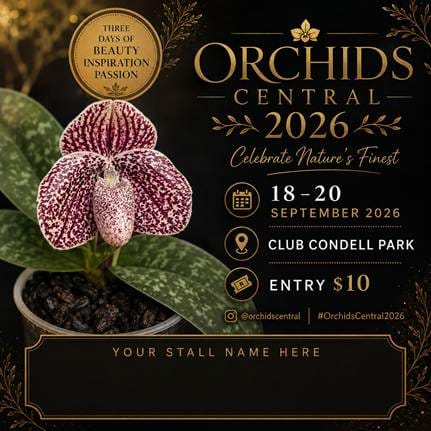
What to give AI for better results
- Event details: name, dates, venue, opening hours, entry price, ticket link and parking notes. Always double check these, AI occasionally manipulates them meaning all of a sudden your image or text has the wrong opening time listed.
- Target audience: existing growers, gardeners, families, collectors, beginners or local weekend visitors.
- Tone: practical, warm, inviting, professional, beginner-friendly or collector-focused.
- Previous examples: paste older posts that sounded right so AI can match the style.
- Images or video notes: describe the photo or upload it where the tool allows image input.
- Constraints: no incorrect plant names, no overpromising (AI will sometimes talk about Orchid Wonderlands or make the event sound like a rock concert), no invented vendors, no en-dashes (AI’s favourite) and avoid excessive emoji’s which AI also loves but which too many feel are fake or childish.
Ready-to-use AI prompt library
|
Use case |
Prompt |
|
Campaign
calendar |
Create a
three-month digital marketing calendar for an orchid show in NSW. The event
is [details]. The primary platform is Facebook, supported by Instagram, email
and local media. Include weekly post ideas, suggested formats, and the goal
of each post. |
|
Facebook
post |
Write an
engaging Facebook post for an orchid show. Audience: local gardeners, orchid
growers and people looking for a weekend outing. Include date, venue, entry
price, plant sales and friendly grower advice. Keep it practical and
inviting. Use Australian English. |
|
Vendor
profile |
Turn these
dot points into a short vendor profile for Facebook: [vendor details]. Make
it appealing to orchid collectors and general visitors. Do not invent plants
or claims. |
|
Caption
from photo |
Write
three caption options for this orchid show photo: [describe or upload photo].
One should be beginner-friendly, one should appeal to collectors, and one
should be suitable for a final-week reminder. |
|
Media
release |
Write a
short media release for a local newspaper about [event name]. Include who,
what, when, where, why it is interesting, plant sales, displays, and contact
details. Keep it suitable for a community news editor. |
|
Flyer
improvement |
Improve
the wording on this orchid show flyer. Make it clearer, more inviting and
easier to read on a phone. Keep the essential details and suggest what should
be moved from the graphic into the caption. |
|
Repurpose
content |
Turn this
Facebook post into: 1 Instagram caption, 1 email paragraph, 1 local community
group post, and 1 short Reel script. Keep the message consistent but adapt
the wording for each platform. |
|
Minutes to
update |
Summarise
these committee minutes into a short public update for an orchid show
Facebook group. Focus only on information the public needs or would find
interesting. Do not include internal committee details. |
|
Image
concept |
Suggest
three realistic image concepts for promoting an Australian orchid show. The
images should use real orchids, real people or real show settings. Avoid
fake-looking flowers and avoid text overlays unless the design is a flyer. |
|
Ad copy |
Write five
short ad copy options for a Facebook ad promoting [event name]. Target people
within a 60-minute drive who like gardening, indoor plants and weekend
events. Include a clear call to action. |
8. Organic and paid promotion
Organic promotion is what you can achieve without paying: posts, shares, email, website updates, member networks, community groups and local listings. Paid promotion is used to extend reach beyond people who already follow the society. Most shows need both. Organic media builds trust; paid media solves the reach problem.
|
Event type |
Suggested paid digital
budget |
Best use |
|
Small
local society show or shopping centre display |
$100 to
$200 |
Boost one
or two strong posts to people nearby who like gardening, indoor plants and
local events. |
|
Medium
weekend hall show |
$300 to
$800 |
Boost
several posts, test different images, and run a final-week reminder campaign. |
|
Larger
regional fair or vendor-heavy event |
$600 to $1,000 |
Use a mix
of awareness and ticket/admission campaigns, vendor content and retargeting
where possible. |
Boosted posts versus Meta Ads Manager
For most small societies, boosting a strong Facebook Page post is acceptable and much better than doing nothing. The best post to boost is usually one with a strong real image, clear dates, a venue suburb, a simple public appeal and a link or call to action. Do not boost a cluttered flyer with tiny text.
For larger shows, Meta Ads Manager is the better approach. It gives more control over audiences, placements, budgets, testing and campaign objectives. If no one in the society is comfortable with Ads Manager, start with boosted posts and build skill over time.
|
Recommended approach Small show: boost the best posts
carefully. Larger fair: use Meta Ads Manager if someone has the skill. Either
way, use real images, local targeting and a clear call to action. |
Targeting for paid promotion
- Use a practical driving radius. A small show may focus on 10 to 25 kilometres. A larger fair may target 60 to 90 minutes of travel.
- Use hybrid audiences: local geography plus interests such as gardening, orchids, indoor plants, flowers, markets, weekend activities and plant nurseries.
- Promote to existing followers and people who engaged with previous event content where possible.
- Use collector-focused messages for vendor announcements and broader public messages for displays, advice and a beautiful day out.
- Test modestly if budget allows. A $20 test can help identify whether a flower photo, vendor post or general event graphic performs best before spending more.
How to tell whether paid promotion worked
- Compare reach and engagement between paid and unpaid posts.
- Look at ticket clicks, Eventbrite or Humanitix sales, and spikes after boosted posts.
- Ask visitors how they heard about the event, either informally at the door or through a simple tick-box question.
- Check whether follower growth, email signups and member enquiries increased during the campaign.
- Record the amount spent, strongest creative, best audience and lessons for next year.
9. Branding and design
Branding does not need to be complicated. It simply means that the event looks recognisable each time someone sees it. A consistent look makes a society appear organised and trustworthy. It also helps people realise that several posts are part of the same event campaign.
- Choose one main colour palette and use it throughout the campaign for example Orchids Central is Gold and black, Summer Orchid Festival is lolly pink .
- Use one or two fonts. Avoid decorative fonts for important details.
- Use one event logo or society logo consistently.
- Use a consistent image style, preferably real orchids from members, vendors or past shows.
- Repeat the core message: dates, venue, plants for sale, displays, advice and tickets or entry price.
- Keep designs mobile-friendly. Most people will see the post on a phone.
From old flyer to polished campaign
|
Weak approach |
Stronger approach |
|
A
cluttered A4 flyer posted as an image with tiny text. |
A simple
mobile-friendly graphic with the event name, dates and venue, supported by a
caption with full details. |
|
One post
the week before the event. |
A
three-month campaign that builds awareness, interest and action. |
|
Stock
orchid image from the internet. |
A real
photo from a member, vendor or previous show. |
|
“Annual
Show, all welcome.” |
“See
hundreds of flowering orchids, buy plants from specialist growers and get
advice from local orchid society members.” |
|
Different
colours and styles every post. |
A
consistent Canva template adapted with different photos and messages. |
|
No clear
call to action. |
“Book
tickets”, “Save the event”, “Bring your orchid questions”, or “Visit us this
weekend”. |
Accessibility basics
- Use readable text size and strong contrast.
- Keep important details out of busy parts of a photo.
- Do not rely on colour alone to convey information.
- Repeat dates, venue and entry price in the caption, not only in the image.
- Use plain language for public posts. Specialist orchid terms can be added when the audience is mainly growers.
10. Volunteers, approvals and workflow
Many orchid societies will have one person doing most of the marketing. Your approach to any approvals should not pretend otherwise. The realistic aim is to make that person’s job easier by using templates, a simple calendar and pre-approved messages. Larger shows may benefit from a small marketing team, but even then the workflow should remain simple.
Single-person workflow
- Create the three-month content calendar.
- Prepare Canva templates before the campaign begins.
- Collect photos and vendor details early.
- Schedule posts in batches where possible.
- Keep a simple document of approved event details so captions remain consistent.
- Use AI to draft, but check names, dates, prices and claims before posting.
- After the event, record what worked while it is still fresh.
Larger-show workflow
|
Role |
Responsibility |
|
Marketing
lead |
Owns the
calendar, coordinates approvals and keeps the campaign moving. |
|
Content
collector and Designer |
Requests
photos, vendor details, member stories and setup updates. Maintains Canva
templates and prepares graphics. |
|
Photographer/video
helper |
Captures
fresh content before and during the event. |
Approval workflow
Committees should approve the campaign direction, event details, budget and key messages early. They do not need to approve every routine post if the marketing person is using agreed templates and accurate information. For riskier content, such as sponsors, ticket conditions, complaints or major changes, approval should be sought more as an accuracy check than anything else.
- Approve core event details once: date, venue, price, times, ticket link, parking and contact details.
- Approve the look and feel: colours, logo, flyer, templates and tone.
- Approve the paid advertising budget and who can spend it.
- Nominate one person who can quickly approve urgent posts or corrections.
11. Measuring success
Measurement does not need to be complicated. The purpose is to learn what worked so the society can improve next year. A one-page report is enough for many events.
What to measure
- Attendance numbers, including daily totals if possible.
- Ticket sales or registrations, including online and door sales.
- Facebook reach, engagement and follower growth during the campaign.
- Instagram reach and Reel views if used.
- Email signups or newsletter growth.
- Attendee feedback, including whether customers said they saw the event online.
- Member enquiries and new memberships.
- Plant sales feedback where vendors are willing to share general observations.
- Paid promotion spend, best-performing posts and lessons learned.
Post-event report template
|
Section |
Notes to complete |
|
Event
details |
Name,
date, venue, opening hours, entry price and weather or major external
factors. |
|
Goals |
Attendance,
ticket sales, plant sales, new members, community awareness and younger
audiences. |
|
Marketing
activity |
Platforms
used, number of posts, email sends, media releases, local listings and paid
ads. |
|
Results |
Attendance,
tickets, reach, engagement, follower growth, email signups, enquiries and
memberships. |
|
Best
content |
Top three
posts or videos and why they worked. |
|
Paid
advertising |
Budget,
audience, results, best-performing creative and recommendation for next year. |
|
Feedback |
Comments
from visitors, vendors, volunteers and members. |
|
Lessons
learned |
What to
repeat, what to improve and what to stop doing. |
|
Next
actions |
Update
media library, save templates, record vendor assets, and set provisional
timeline for next year. |
12. Risk, reputation and governance
Most social media issues can be managed with calm, clear processes. Orchid societies should not be afraid of public communication, but they should know how to handle common problems.
- Negative comments: respond politely if the issue is genuine, correct misinformation, and take complex matters to private messages or email.
- Complaints: acknowledge the concern, avoid arguing publicly, and refer to the show chair or nominated contact.
- Spam and scams: hide or delete fake ticket links, suspicious comments and unrelated promotions quickly.
- Photo permissions: use member and vendor images with permission. Be especially careful with children and close-up identifiable people.
- Vendor logos: ask vendors to supply their logo or approve use of existing assets.
- Music: use platform-safe music or royalty-free options for videos. Avoid uploading copyrighted music without permission.
- Privacy: when collecting email addresses, competition entries or attendee data, tell people what it will be used for and do not share it casually.
13. Case study: Orchids Central as a practical model
Orchids Central is useful as a case study because it shows how an orchid event can present itself as both serious enough for collectors and welcoming enough for the general public. The key lesson is not that every society needs to copy a large event. The lesson is that consistent branding, repeated messaging, strong visuals, ticketing links and regular updates can make an orchid event feel current and worth attending.
- Clear event identity: a recognisable name, consistent visual style and repeated core message.
- Public-facing positioning: not only “orchid show”, but a destination event for plants, displays, vendors and advice.
- Content variety: ticket announcements, vendor highlights, display updates, practical information and countdown posts.
- Use of real imagery: orchids, flyers, setup content and event-specific visuals rather than generic stock images.
- Ticketing as marketing: an online event page gives people a place to commit and a link that can be shared across platforms.
- Community growth: a Facebook group can become more than a noticeboard; it can build anticipation, answer questions and keep people engaged between events.
|
Transferable lesson A smaller society does not need the
same budget or scale as an event like Orchids Central. It can copy the
discipline: start early, look consistent, post regularly, use real photos,
make attendance easy, and review the results afterwards. |
14. Practical checklists
Before the campaign starts
- Confirm event name, dates, venue, opening hours and entry price.
- Confirm whether tickets or registrations will be used.
- Create or refresh the Facebook event.
- Prepare Canva templates and a simple visual style.
- Create the shared media library.
- Collect previous show photos and new member photos.
- Collect vendor names, logos and short descriptions.
- Prepare website, email and local listing copy.
- Agree on the paid advertising budget.
- Nominate who will answer public questions.
Final month checklist
- Post two or three times per week, increasing in event week.
- Share into relevant community groups where allowed.
- Boost the strongest post or run the planned ads.
- Publish practical information: parking, venue, entry price, opening hours and accessibility.
- Send final email reminder.
- Post vendor and plant sales reminders.
- Prepare opening-day and final-day posts in advance.
- Make sure all links are correct and easy to find.
Event-day checklist
- Pin the key event information post.
- Post fresh photos early in the day.Answer common questions quickly.
- Capture short video clips for Reels and next year’s media library.
- Share judging highlights if appropriate and names are checked.
- Post a final-day reminder before the last day opens.
- Thank volunteers, vendors, exhibitors and visitors after the event.
Conclusion: just give it a go
Digital marketing can feel intimidating for orchid societies, especially when committees are busy and volunteers are already stretched. The encouraging truth is that a society does not have to do everything at once. A Facebook event, real photos, consistent Canva templates, a few useful posts, a modest boost and a simple post-event review can make a real difference.
The goal is not perfection. The goal is to be present, consistent and welcoming. Every show gives a society more photos, more stories, better examples and better data for next year. Start small, keep records, learn what works, and build from there. The orchids are already worth seeing. The job of digital marketing is simply to make sure enough people know they are there.
Useful official links
These links are included for volunteers who want current platform instructions. Platform interfaces change often, so always check the official help pages before preparing step-by-step screenshots.
- Meta Help: Create an event for your Facebook Page
- Meta Help: Schedule a post for a Facebook Page
- Meta Business Help: Boost a post from your Facebook Page
- Eventbrite Australia: organiser pricing and features
- Humanitix: quick start guide to creating an event
- Google Business Profile Help: create and manage posts
- Canva: Facebook event cover maker
- CapCut: social media video creator
Member discussion